Backgammon

Game preview: Backgammon

TURNS0
WHITE · OFF0
BLACK · OFF0

Backgammon

Game menu

Settings

Sound

Information

Interactive demo

Watch 10 complete turns at a relaxed pace: rolling dice, moving checkers, using doubles, hitting and re-entering from the bar. You can stop at any time; your current round is restored.

How to play

Direction and selection

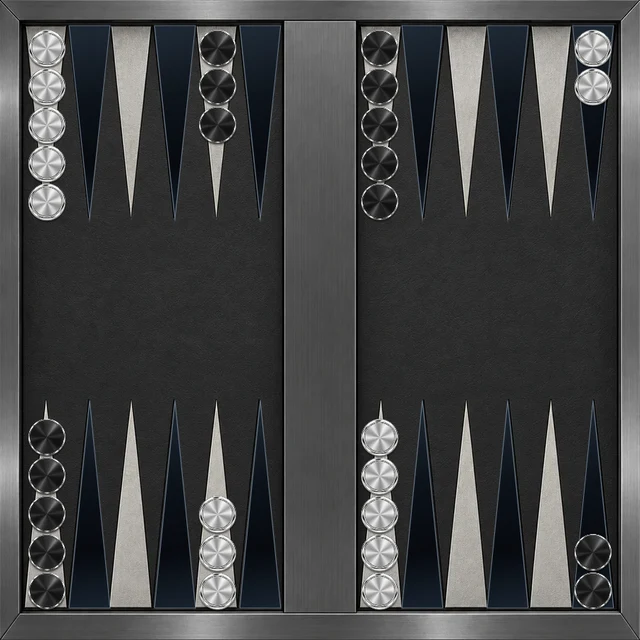
White moves anticlockwise towards the lower-right home board; Black moves clockwise towards the upper-right. Roll, select your checker and a marked destination. Select a die to choose the distance.

Hits and the bar

Two or more opposing checkers block a point. A lone opposing checker is hit and sent to the bar. Your bar checkers must re-enter before any other move.

Using the dice fully

Use both dice when possible. If only one can be played, the higher die takes priority. Doubles provide four moves. Undo is available during your own turn before confirmation.

Bearing off and victory

Bear off into the tray on the right only after all fifteen checkers reach home. An oversized die may remove only the checker farthest from the edge. Bear off all checkers first to win. There is no doubling cube.

Aids and local play

Help marks a recommended move without playing it, and each display is counted. Repeat only shows the last computer moves without changing the position. In local two-player play, the higher opening die starts using both dice; ties are rerolled.

Pausing and saved games

When registered and signed in, you can save your Backgammon position in one of three slots shared across games and continue later.

Start a new game?

Your current game progress will be lost.

0Moves
0:00TIME
0Captured pieces
0Lost pieces

Leave game?

Do you really want to leave the game and return to the home page?

About the game

Game idea

Backgammon combines a race with a struggle for safe positions. Each side brings fifteen checkers around the board into its home board and then bears them off.

What matters

The dice provide possibilities, but you decide how to distribute the moves. Closed points offer protection; exposed single checkers can lose time when they are sent to the bar.

This version

Play against the computer or with another person on one device. This implementation uses single games without a doubling cube; the menu guide explains compulsory moves and bearing off.

Backgammon: how to play and options

Goal and key rules

Bring all fifteen checkers home and bear them off first. A lone opposing checker can be hit; two or more block a point. Checkers on the bar must re-enter before other moves.

Controls

Roll, select a die if needed, then choose a checker and marked destination. Doubles provide four moves. Undo corrects moves before your turn is confirmed; Help shows a suggestion and Repeat shows the last computer moves.

Playing tips

Hold important points with at least two checkers. Racing can help, but an exposed lone checker risks being sent back through the bar. Consider both dice together before committing to the first move.

Settings and variants

Scroll view enlarges the board halves and lets you swipe between them. Opponent mode, strength and dice animation are also selectable. This version has no doubling cube.

  • Players: Human vs computer, Human vs human.
  • Board view: Normal mode, Scroll mode.
  • Computer strength: Casual, Challenging, Expert.
  • Dice speed: Fast, Natural, Relaxed.
  • Dice rotations: 3 rotations, 5 rotations.

Display and sound

The timer display can be shown or hidden. Reduced motion limits effects while keeping necessary game movement visible. Sound can be switched on or off independently. Adjustable volume: Roll dice, Select a piece, Move, Hit a checker, Bear off a checker, Victory, Defeat.

On a new page visit, Start game begins a fresh round using your saved preferences. An abandoned round does not resume automatically. Game information explains further scoring details and available assists.