Arrow Cube

Game preview: Arrow Cube

Removed0 / 27
Taps0
Blocked0
Hints0

Arrow Cube

⊙ Out of this face · ⊗ Into this face

Game menu

Game settings

Choose a readable surface: wood, light brushed aluminium, brushed steel or dark graphite. Only appearance changes; the current round stays intact.

Remove only: blocked blocks stay put. Slide into gaps: a blocked block moves up to the nearest obstacle when there is room. Each variation has its own 25 levels per cube size.

25 hard levels for each variation in 4 × 4 × 4 or 5 × 5 × 5. Sliding levels start with empty spaces.

Sound

Game information

Goal and rules

Empty the cube

Tap a wooden block. A clear straight route removes it. In Remove only, a blocked tap just nudges the piece. In Slide into gaps, it travels through available cells until it touches the next block. An adjacent obstacle prevents any shift.

Clear all pieces to finish. No lives or time limit. Taps, blocked attempts, internal slides, hints, undos and active time are measured. Internal moves are different from removals: they can alter the dependencies between other pieces.

The Memory Cube controls

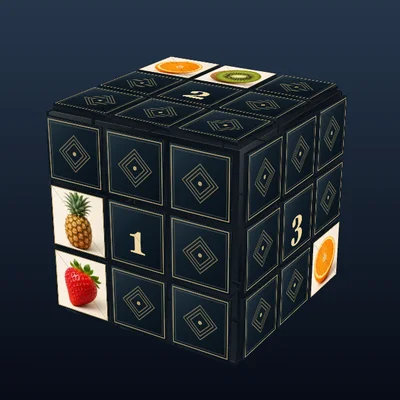
Drag with one finger, mouse or pen to rotate around screen axes, even upside down. Dragging never removes a block. Buttons 1–6 smoothly turn toward a face while retaining an oblique view and visible neighbouring side, chosen closest to your current view.

On the focused cube, arrows move the gold selection, Enter or Space taps it, Shift plus arrows rotates, and digits 1–6 align a face. Use +/− or the zoom buttons to change size. Reset view returns to the starting angle.

Arrows in three dimensions

The arrow direction belongs to the whole block. It stays fixed while you rotate the view. Arrows on different faces of that piece are consistent projections of the same direction.

The outermost occupied plane always has complete arrow faces and at least one free exit. Slides stay within their plane and preserve this property. Clear the exposed pieces to reveal the next plane. Dot/cross end caps are never the only information needed for a solution.

Hints, undo and interruptions

Hint counts one aid and turns to a fully visible real direction arrow. It never selects a dot/cross-only view. Blinking starts after the turn and lasts until a successful move or Undo. Wrong taps and rotation keep the hint; menus and background pause it. Reduced motion uses a steady mark.

Menus, backgrounding and graphics loss pause play time and motion. Closing the menu or restoring graphics resumes the same cube. Reduced motion shortens flights and face alignment. No idle animation runs on the cube.

Levels and results

Choose variation and cube size in Settings. Each combination has 25 own levels. Changing them there asks before replacing an active attempt. Tap Level to advance immediately within the current combination; after 25, it restarts at 1. Next and Play again preserve variation and size.

Only preferences persist locally. Each visit starts fresh. Account saves and rankings are disabled. Active time excludes menus and background time.
Restart or change level?

Your current level will be restarted.

Level complete!

Time
0
Taps
0
Blocked
0
Hints
0
Undos
0
Internal slides
0

About Arrow Cube

Every arrow has its route

Tap a wooden block to move it in its fixed arrow direction. If its route is clear, it flies out. In the optional sliding variation, a blocked piece can travel through a gap and stop against the nearest obstacle.

Look around the corner

Rotate to find a fully visible direction arrow on an outer occupied plane. Clear its blockages to uncover the next plane. No solution requires guessing from a cross or dot on an end cap.

Two variations, 25 levels each

Choose Remove only or Slide into gaps, in 4 × 4 × 4 or 5 × 5 × 5. Each combination has 25 own demanding levels. Hint marks a safe block; Undo also returns pieces shifted inside the cube.

Rules, controls and settings

Goal and rules

Clear every block from the cube along its fixed arrow. Remove only needs a completely free exit route. Slide into gaps additionally lets a blocked piece move as far as the nearest obstacle permits; touching blocks stay put. Blocks never overlap or rotate individually.

Every position has a removable block with a real arrow face you can reveal by rotating. Work through exposed planes; inner arrows become visible as the outer parts leave. This remains true after internal slides. Blocked taps count but cost no lives; there is no time limit.

Rotation and controls

Drag the cube to rotate freely. Buttons 1–6 show the selected face at a slight angle, with a neighbouring side visible. Tap Level in the upper-left statistics to advance immediately; after 25 it starts at 1 again.

Use + and − to zoom and Reset view for the starting angle. On the canvas, arrow keys select a visible block, Enter or Space activates it, Shift plus arrows rotates, and 1–6 shows a face.

Read the direction

A real arrow runs along its marked face. The end-cap signs ⊙ (out) and ⊗ (in) are supplementary; no required step relies on those alone. Rotate to the outer occupied plane to see complete arrows.

Check long pieces across their full width. Hint automatically turns the cube until the recommended block and its symbol area are clearly visible. Its symbols then blink until a block is actually moved or removed. Wrong taps keep the hint; reduced motion uses a steady mark.

Levels and preferences

Both variations and both sizes have 25 newly checked levels each. Classic boards start full; sliding boards contain gaps. Tight blocker chains make the puzzles demanding while real direction arrows remain available throughout.

Changing variation, size or level through Settings asks before replacing an active attempt. Material, timer, reduced motion, sound and volume keep the round. Wood, light brushed aluminium and steel use dark symbols; dark graphite uses light symbols. Tapping Level immediately advances within the current combination.

  • Material: Warm wood, Light brushed aluminium, Brushed steel, Dark graphite.
  • Variation: Remove only, Slide into gaps.
  • Cube size: 4 × 4 × 4, 5 × 5 × 5.
  • Next level: Levels 1–25 per cube size.

Display and sound

The timer display can be shown or hidden. Reduced motion limits effects while keeping necessary game movement visible. Sound can be switched on or off independently. A volume slider is also available.

Only preferences persist. Account saves and rankings are disabled.