About Peg Solitaire
Make room for the first jump
The board starts full. Remove one glass ball yourself, then use the opening to jump and remove the ball you pass over.
Think from the edge inward
Each jump removes a ball and changes the available routes. Keep distant balls connected and aim to leave exactly one, anywhere on the board.
Twelve shapes, one quiet challenge
Crosses, round and angular boards offer different routes. With diagonals enabled, each shape has a checked solution for a suitable opening. Hints, undo and a short demonstration help you learn.
Rules and controls
Goal and ending
Start with a full board and remove one ball. Then jump over one adjacent ball along an allowed grid line into the empty well immediately beyond it. The jumped ball is removed. No chain jump is automatic. Exactly one remaining ball anywhere on the board wins. If no jump remains with more than one ball, the attempt is blocked.
Tap, jump, remove
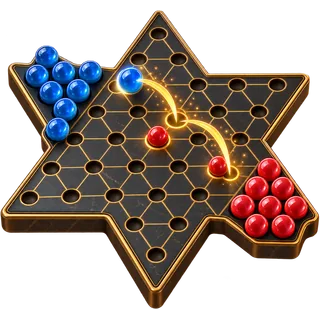
Tap or click a ball, then its glowing empty destination. Tap the selected ball again to deselect. Keyboard: Tab or arrow keys move focus; Enter or Space activates a well; Escape clears selection. All boards default to horizontal, vertical and diagonal jumps. In settings you can restrict jumps to horizontal and vertical only. On triangular and hexagonal grids, the sloping grid lines are diagonals; vertical jumps follow aligned wells.
Plan ahead and try again
Work inward and avoid isolated balls at the edge. Undo also lets you change your first removal. Hint marks a checked next jump while you follow a stored solution; elsewhere it marks one legal jump without promising a win. Hints and undos are counted. Closing a result lets you inspect the board and undo. Solve game plays a checked solution after the first ball has been removed, before any jump. After a jump it stays disabled until a new round, even if you undo. With diagonals every opening is supported; without diagonals the button requires a checked route. Stop solution keeps the moves already shown. Using it counts as one solution aid, and the result is labelled as assisted. Enable Show solution button in settings to display Solve game; it is hidden by default.
Boards and preferences
Choose one of twelve boards. A board change or restart asks before replacing an attempt. Show the active timer, reduce movement or adjust sound separately. Only preferences are stored on this device. No round archive, account saves or rankings. Choose one of six ball colours without restarting your round. A change to the jump rules asks before restarting an attempt in progress. Show or hide the solution button without restarting your round.
Display and sound
Show the timer, reduce motion and adjust the sound switch or volume. The solution button is optional and hidden by default.
Only preferences are saved on this device.