About Ring Labyrinth
Rotate, align and enter
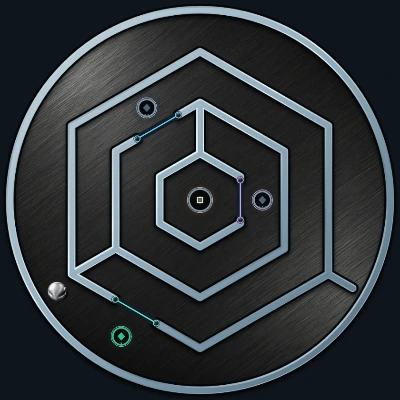
Rotate the entrance roughly beneath the ball. Down hops into the first lane; small misalignments are corrected automatically.
The centre is only halfway
After entry, the entrance closes and a different exit opens opposite it. Reach the gold centre first, then guide the ball out below.
Metal, glass and controlled movement
Metal, colourful glass and new routes: toggle coloured gates with matching circles and use glowing portal pairs A and B.
Rules and controls
Goal and order
The ball waits above the disc. Rotate the entrance beneath it, then use Down to move it into the maze. As soon as the ball is fully inside, the entrance closes seamlessly and a different exit opens on the opposite side of the disc. First reach the gold centre; its indicator turns green. Then guide the ball to the new exit, rotate it to the bottom and move the ball out with Down. Only reaching the centre before leaving completes the round.
The thin coloured circles numbered 1 and 2 are switches. Bring the ball onto a circle to open or close the matching coloured gate. Both briefly pulse when switched. Leave the circle and return to toggle it again. A closed coloured gate blocks the passage; an open gate leaves only a fine dotted trace and its endpoints.
Matching letters in the same colour form a portal pair. Reaching a letter beams the ball to its matching pad. The disc automatically aligns the destination with the vertical ball track. Both letters light up. Arrival never immediately beams you back: leave the destination and enter it again to reactivate it. Mazes 1–4 have pair A; mazes 5–12 also have B.
Rotate the disc, move the ball
The rotation buttons move the disc directly to the next useful detent, aligning a passage, switch or portal with the ball. Dragging with a finger or mouse also snaps from passage to passage. Tiny finger movements do not trigger a turn. Each Up or Down press moves the ball to the centre of the next reachable lane. Small alignment differences are corrected automatically. A closed wall blocks the step, leaving the ball and disc at their previous positions. Hold to repeat whole steps. Keyboard: focus the board and use the four arrow keys; Space stops repetition.
Plan the outward journey
Align a passage roughly above or below the ball and press the matching arrow. The ball hops one lane further and waits for your next step. Then rotate to the next passage. Closed walls cannot be skipped. After entry, the old entrance is sealed and the new exit is opposite it. Reach the centre first, then leave below: an early departure does not finish the game. There is no time limit.
Labyrinths and preferences
Tap the maze statistic at the top to jump immediately to the next of twelve levels; after 12 comes 1. This starts a new round. Settings also allows direct selection and asks before replacing a started round. Colour and glow can change without resetting it; amber is the default. The optional clock counts active playing and thinking time, excluding menus and the background. Reduced motion removes step and beam animations and pulses; active colours remain visible. Only preferences are stored on this device; account saves and rankings are not enabled.
Display and sound
Choose the ball colour, switch glow and timer on or off and adjust the quiet sounds. Reduced motion removes the brief step animations.
Only preferences are stored on this device.